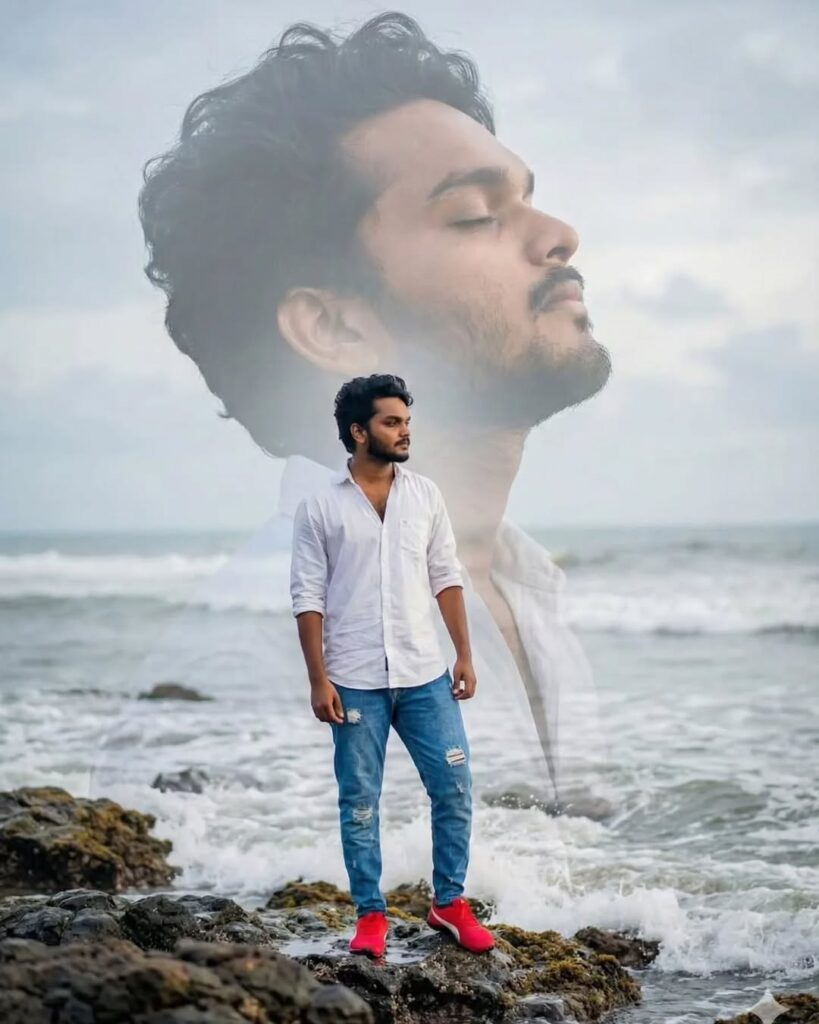
“Use the uploaded image as the main subject. Keep the person’s real face, skin tone, clothes and details exactly the same. Create a cinematic portrait where the main subject stands in full color in the foreground. Behind them, create a large faded profile of the same person, looking calm with closed eyes, softly blended into the sky. Do NOT make the front person translucent. Only the background profile should be soft, dreamy and faded.

A Uploaded image double-exposure portrait of a young woman standing on rocky shore by the ocean. In the foreground, she wears a deep same dress with golden embroidery, looking calmly to the side. Behind her, a large translucent profile of the same woman appears with closed eyes, creating a dreamy, emotional, reflective mood. Soft overcast sky, gentle ocean waves, natural lighting, cinematic tones, artistic composition, high detail, ethereal atmosphere.

ADDITIONAL EXACT SPECIFICATIONS (do not change):

• Place the large background profile behind and above the foreground subject’s head, filling the top half of the frame; scale the background profile to about 55–65% of the image height.
• The background profile must face the opposite direction of the foreground subject (if the foreground faces right, the background profile must face left — and vice versa).
• Make the foreground subject fully sharp, high-contrast and richly saturated (keep original clothing color and texture exactly). Do NOT reduce opacity of the foreground.
• Make the background profile soft, low-contrast, mostly monochrome (desaturated to near-gray) with a gentle blue-gray tone from the sky; apply a soft gaussian blur and light feather so it reads as a large faded portrait behind the subject.
• Ensure no double-exposure translucency on the front subject — only the background face is dreamy/faded.
• Background ocean and rocks must be high-detail, dramatic and attractive: emphasize textured wet rocks, visible tide pools, and natural wave splashes around the subject’s feet (small water splashes and foam visible).
• Add a subtle vertical light wrap / rim light around the foreground subject so they separate from the faded background profile.
• Use natural cinematic lighting (soft overcast fill, subtle warm rim light), film-like tonal curve, and slight film grain for realism.
• Camera: emulate 85mm focal length for flattering compression; aperture around f/2.8–f/4 (foreground sharp, background softly blurred).
• Color grading: foreground vibrant, background near-monochrome with soft blue-gray cast; keep overall mood cinematic and emotional.
• Composition & Aspect Ratio: Instagram feed portrait 4:5 (1080×1350 px recommended). Center the foreground subject vertically so the background profile sits behind the head.
• Final output: high detail, photorealistic, 4:5, keep the person’s identity and facial features unchanged, maintain original clothing and pose from uploaded image.
Little White glow behind the person

Stronger highlight on clothes + skin

Background portrait deep, rich black-and-white

Dark corner vignette (vintage look)

Instagram 4:5 ratio

Foreground sharp + colourful, background faded portrait opposite direction
Have you ever seen a photo that feels like it was pulled straight out of a movie poster? That’s exactly what happened when this double-exposure portrait started blowing up on Instagram, WhatsApp statuses, and Pinterest boards. A young Indian guy in a simple white shirt and ripped jeans, standing confidently on a massive sea rock with waves crashing around him, while his own giant, semi-transparent face floats peacefully in the sky above, eyes closed, like a guardian spirit of the ocean.
It looks expensive. It looks like it took hours in Photoshop. Truth? It took exactly 18 seconds and one perfectly crafted prompt in an AI image generator.
What This Tool Gives You
✅ 1. Copy Prompt Button
One click — the entire cinematic double-exposure prompt is copied automatically.
✅ 2. Gemini AI Button
Opens the official Gemini Image Generator instantly.
✅ 3. Sample Generated Image
Shows viewers exactly what kind of output they can create using the prompt.